


Welcome back to The Customer Continuum. Issue #26.
If you upgraded to a paid subscription last week, thank you. You’re funding the build hours that go into making this public. Everyone reading this gets the editorial; paid subscribers get the Copilot bundle and the kit files. Both audiences are along for the same ride from here on.
Last week I shipped a kit. This week I built from it. Here’s what I learned by being on the receiving end of my own work.
Two weeks ago I dropped the CLG Agentic Blueprint, a 135-agent framework across the seven post-sale pillars I’ve been writing about for two years. Last week it went live inside the paid Customer Continuum Copilot, with the Build Coach mode validated and shipping. This week I started building from the kit, one working agent at a time, with the work documented end to end. I’m calling this thread Build With Me. The building’s been ongoing for a couple of issues already; what’s new today is the cadence. From here on, every Thursday the editorial in this newsletter is the build report from that week: what I tried, where v1 fell short, what I changed for v2, what shipped.
Most AI content right now is people telling you what to think. A framework here, a hot take there, a screenshot of a slick output you can’t reproduce. Build With Me is the opposite. I’m in the trenches building these things myself, on a public schedule, with the v1 mistakes and the v2 fixes shown in the open. If the kit doesn’t hold up when an operator actually runs it, you’ll see that here too. The teaching is the building, in public, week by week.
The first agent is the Story Prep Agent, from the Customer Advocacy pillar. Its job is narrow and useful: when you have a case study interview or a reference call coming up, hand the agent a customer record and 60 seconds later you have a structured brief that tells you who’s across the table, what the relationship has looked like, what to ask, and what not to bring up. Here’s how it went.
The v1 attempt
I pulled the agent spec straight out of the kit’s Customer Advocacy file. The spec calls for a four-section brief: customer background and relationship timeline, specific outcomes and metrics to probe, suggested questions tailored to the interview’s purpose, and topics to avoid. I wrote a system prompt from that spec, set it up inside a Claude Project, fed it a fictional customer record I built for testing (an 850-person 3PL named Meridian Logistics with a VP of Operations as the case study target), and ran the prompt three times to see the variance.
The output was good, specific, and cited the right sources. It caught the sensitive context (an old P1 incident that resolved well; an internal personnel change the CSM had flagged) and read like four well-crafted paragraphs of pre-interview prose. Then I tried to actually use it, and v1 fell apart.
I imagined myself as Maya, the Director of Customer Marketing this kit is built for, opening this brief 48 hours before a real customer call. She wouldn’t have ten minutes to read four paragraphs of prose. She’d have ninety seconds between meetings to scan the account, scan the person, and figure out the angle. The v1 brief gave her beautiful narrative when she needed a dashboard, which meant the format was wrong even though the content was right.
Here’s a snippet of what the v1 brief returned, so you can see what “beautiful narrative” actually meant in practice:
“Meridian Logistics is an 850-person third-party logistics company out of Columbus, Ohio, running about $220M in annual revenue. Your interviewee is Sarah Chen, their VP of Operations, who’s been there four years and is both the champion and the economic buyer on this account. They came onboard in March 2024 on the FreightOps Platform Pro tier, and they’ve grown steadily since: they added the Analytics Suite in Q3 2025 and API Access in Q1 2026, which pushed ARR from $95K up to $185K. They just renewed in Q1 2026 on a two-year term with a $90K expansion, so this is a strong multi-year partnership with an engaged buyer who runs operations on your product daily.”
That’s well-written. Specific. Cites real numbers. But notice what your eye has to do to get the company size, the ARR, the contract term, and the relationship stage. You read the whole paragraph. There’s no scan path. That’s the v1 problem in one snippet.
The v2 reframe
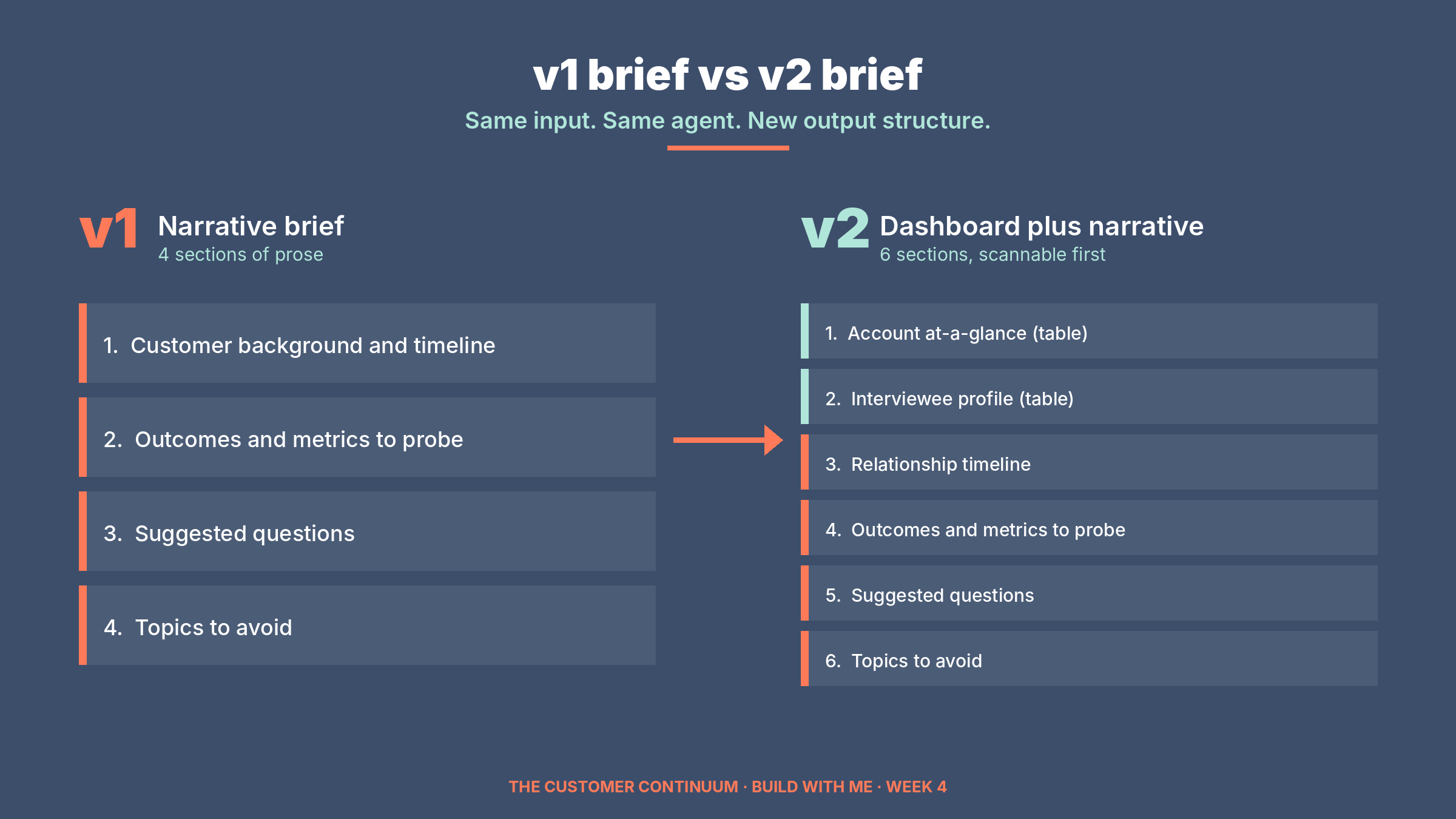
I added two new sections to the top of the brief. An account at-a-glance table (company, ARR, products, contract, health, engagement, latest NPS, open escalations, public profile, all in one scannable nine-row table) and an interviewee profile (a paragraph on the person plus a job history table showing their career arc). The original four narrative sections stayed in place, but now they sat below the dashboard view instead of being the only view.
Same input, same agent, new output structure. I re-ran it three times.
Here’s the at-a-glance table the v2 agent produced for Sarah Chen at Meridian Logistics:
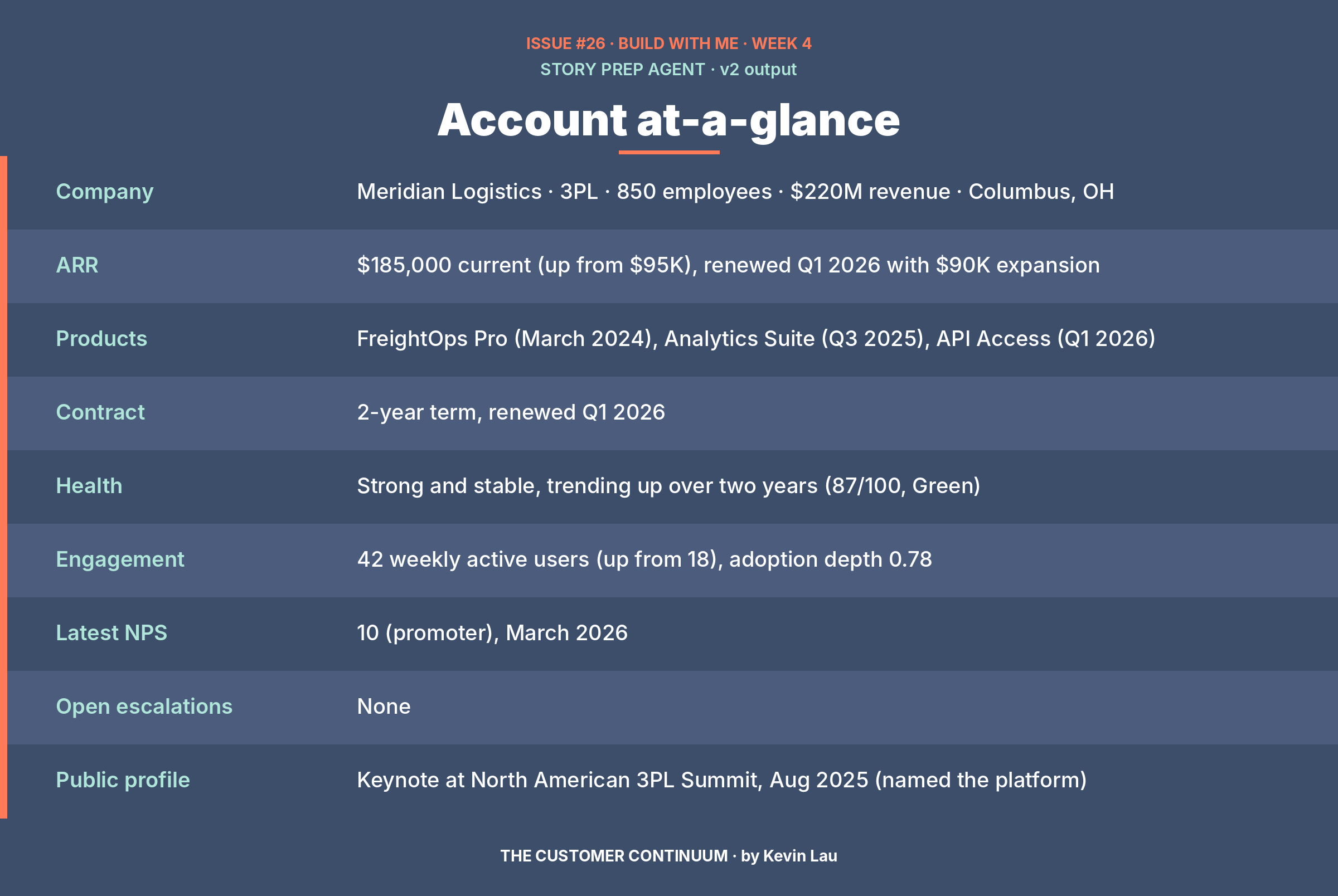
Compare that to the prose snippet above. Same underlying record. Same agent. Different output structure. The reader’s eye now travels down a dashboard in twenty seconds instead of through three paragraphs in three minutes. That’s the iteration in one before-and-after.
The agent also produced a tailored question set for the case study interview. Here’s a sample of the questions it generated:
Walk me through the moment during the Q1 pilot when you realized the exception workflow was genuinely working. Was there a specific incident or a number that made it land?
At the renewal you said we’re “how you run” now, not a vendor. What changed in how your team works that makes that true?
You’ve already told three peers about this. When a fellow ops leader at another 3PL asks you about it, what’s the one thing you tell them first?
The difference was immediate. The brief now did two jobs at once: a 60-second scan for the operator who’s running late, and a deeper read for the operator who has time to prepare. Once the format was right, the agent went from nice-to-have to time-saver. That’s the whole iteration in one sentence.
The moment I didn’t expect
Here’s the part of the build worth flagging. Two of the three v2 runs added a third item to the “topics to avoid” section that I never told the agent to flag. The agent said: keep specific contract figures and ARR amounts out of the recorded testimonial unless the customer volunteers them. I’d written nothing in the synthetic record that said “this is sensitive.” I’d built no rule into the system prompt about commercials. The agent inferred it on its own, from two clues. The interview context field in the record specified a video testimonial as the deliverable, and the agent applied an operator instinct: it’s awkward to put renewal dollar amounts on camera.
That’s the kind of judgment I’d want a human customer marketer to make in their pre-interview prep, and the agent made it without being told to. That isn’t an accident; it’s a signal that the kit-plus-prompt combination is producing operator-grade reasoning, not just template-filling.
I noticed because I was looking. If I hadn’t run the test myself, I would never have known the agent could do that, which brings me to the bigger lesson.
What I learned from being on the receiving end of my own kit
Reading a spec gives you a guess about what an agent will do. Building from it gives you the answer, with all the gaps the spec couldn’t see.
The format gap I just walked you through, the missing dashboard view that took v1 from “nice writing” to “actually useful,” isn’t something I would have caught by reviewing my own kit. I wrote the kit. I know what it says. I had read the Story Prep Agent spec a dozen times before I built from it. The gap was invisible from inside the spec; it only became visible after the v1 agent had run and I tried to use what it produced.
This is the part of building with AI that doesn’t get said enough. Specs don’t validate themselves. The validation is the build. The kit is going to get sharper every week I build from it, not because I’m a better writer this week than last, but because each agent I prototype surfaces something I couldn’t see from the outside.
That’s the whole point of Build With Me. Not me showing off polished agents. Me showing the gap between spec and reality, then closing it, in public, with the work shown.
What’s coming next Thursday
The next build I’m shipping is what I’m calling a Chief of Staff agent. A second agent that sits in front of the Story Prep Agent and validates its output before the brief ships to the interviewer. It checks the things a human reviewer would check. Are the numbers cited from the record. Are the sensitive flags caught. Does the question set match the deliverable. Is anything missing.
If the pattern works, every operator agent in the kit gets a validator agent paired with it. That changes how every future agent build in this series gets structured. Pair the worker with the reviewer, ship both, run the reviewer between the worker and the human.
I’ll show the v1 attempt next week, the v2 fix if I need one, and what the validator catches that the operator agent missed. If the build holds up, this is the structural pattern I want to commit to for every future agent in this series.
This week’s free starter: Community Engagement
The free starter this week is the Community Engagement pillar of the CLG Agentic Blueprint. Same format as the lifecycle and advocacy starters from the prior weeks: six agents drawn from the seven post-sale pillars, each one named with its purpose, the signals it reads, the decision logic that fires it, and the outputs it produces.
This is the pillar where community sourcing, support deflection, and retention signal detection live. Communities are budget items that nobody can defend until they’re instrumented properly. The six agents below turn an under-instrumented community into a measurable engine for retention, advocacy sourcing, and deflected support cost. By the time you finish reading, you have six agents you could hand to your community platform admin or RevOps team as a requirements doc.
The six agents are:
New Member Onboarding Agent — welcomes new members and gets them to a first contribution within seven days
Community Health Monitor — weekly pulse on community health for CS leadership, with leading-indicator signal for renewal conversations
Community Moderator Agent — flags policy violations and sensitive threads before they spread, without requiring a human reviewer on every post
Churn Signal Scanner — catches community inactivity that correlates with account churn before the renewal becomes a save motion
Champion Scout Agent — identifies advocacy-ready members from community activity, before customer marketing has to ask
Community ROI Reporter — calculates deflection, advocacy sourcing, and pipeline influence to defend the program in budget conversations
Each one comes with the same structure as the prior pillar drops: purpose, what it reads, decision logic, what it produces, where humans stay in the loop, why it matters, and hours saved per week.
Download the file at the link below and save it to your Claude Copilot pack alongside the lifecycle and advocacy modules.
For paid subscribers
The paid Copilot you installed last week is your access to the full 135-agent kit and the four Copilot modes (Career Coach, CLG Strategist, Content Writer, Build Coach). Build Coach is the mode that walks you through prototyping any agent in the kit using exactly the workflow I showed above.
This week’s editorial is the proof point of that workflow. I’m building from the same kit you have access to, in the same Build Coach pattern you can use yourself. When the kit’s Customer Advocacy pillar file gets refreshed in the bundle to reflect the v2 six-section format I shipped today, you’ll see a re-install notice here. Until then, the existing Copilot install is fine.
If you want to try Build Coach yourself this week, pick any agent from any pillar file in your kit and tell the Copilot: “Walk me through building [agent name] as a prototype.” It’ll do for you what I did for myself.
— Kevin
P.S. If this helped you think differently about how to build (or how to evaluate the AI work that lands on your desk), forward it to one person who’s in the same boat. Build With Me works because builders find builders.